Showing posts with label Printables. Show all posts

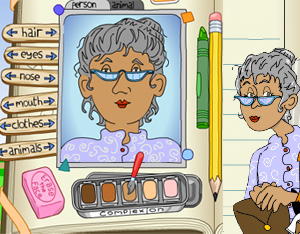
Scholastic Character Scrapbook - Analyze the characters in any book!

Web Address: http://teacher.scholastic.com/activities/scrapbook/

In their own words: Use this reader's response activity to analyze the characters in any book. Print and collect your scrapbook pages.

Interactive Periodic Table of Elements in Pictures & Words

Web Address: http://elements.wlonk.com/ElementsTable.htm

In thier own words: "This pictorial periodic table is colorful, fun, and packed with information. In addition to the element's name, symbol, and atomic number, each element box has a drawing of one of the element's main human uses or natural occurrences. The table is color-coded to show the chemical groupings. Small symbols pack in additional information: solid/liquid/gas, color of element, common in the human body, common in the earth's crust, magnetic metals, noble metals, radioactive, and rare or never found in nature. It does not overload kids with a lot of detailed numbers, like atomic weights and valence numbers."

Childnet - a non-profit organisation working with others to help make the internet a great and safe place for children.

Web Address: http://www.childnet.com/

In their own words: "We are a non-profit organisation working with others to help make the internet a great and safe place for children.

Tagxedo - Word cloud with styles

Web Address: http://www.tagxedo.com/

In their own words: "Tagxedo turns words -- famous speeches, news articles, slogans and themes, even your love letters -- into a visually stunning word cloud, words individually sized appropriately to highlight the frequencies of occurrence within the body of text."

Tagul - A free tool for making custom word clouds.

Web Address: https://tagul.com/

In their own words: "Tagul is an online word cloud generator that enables you to create amazing and unique word cloud art with ease. Professional quality results can be achieved in no time at all, even for users with no prior knowledge of graphic design. Best of all the service is completely free for personal use!"

Math Landing - A database of mathematics lessons and interactive resources for use with KS1 & KS2 pupils

Web Address: http://www.mathlanding.org/

About: Math Landing is a database of mathematics lessons and interactive resources for use with pupils ages between 5 and 11.

An american based site, you can search for lessons and interactive resources by American grade level and or by mathematics topic.

Icon finder - Download and use 1000's of free icons

Web Address: https://www.iconfinder.com/

About: Icon finder is a great resource for teachers wanting to add some icons into their worksheets, presentations, class blogs or VLE pages.

Cursive Handwriting Practice - MULTIWORD WORKSHEETS

Web Address: http://www.handwritingworksheets.com/flash/cursive/multiword/

About: This website lets you make printable worksheets for pupils to practice their cursive handwriting.

Wordle - Create word clouds

Web Address: http://www.wordle.net/create

About: "... a toy for generating 'word clouds' from text that you provide. The clouds give greater prominence to words that appear more frequently in the source text. You can tweak your clouds with different fonts, layouts, and color schemes. The images you create with Wordle are yours to use however you like. You can print them out, or save them to your own desktop to use as you wish."

InkScape - A free vector graphics art program.

Web Address: https://inkscape.org/en/

About: "Inkscape is a professional vector graphics editor for Windows, Mac OS X and Linux. It's free and open source"

G Calc - An online graphing calculator

Web Address: http://gcalc.net/

About: a free graphic calculator best suited for students studying a-level mathematics or higher.

Gnu Plot - Visualise mathematical functions and data interactively

Web Address: http://www.gnuplot.info/

About: As a former Maths Lecturer, this one is close to my heart. It's a "...portable command-line driven graphing utility for Linux, OS/2, MS Windows, OSX, VMS, and many other platforms. The source code is copyrighted but freely distributed (i.e., you don't have to pay for it). It was originally created to allow scientists and students to visualize mathematical functions and data interactively, but has grown to support many non-interactive uses such as web scripting. It is also used as a plotting engine by third-party applications like Octave. Gnuplot has been supported and under active development since 1986."

Free Mind - A free, downloadable, Mind Mapping program.

Web Address: http://freemind.sourceforge.net/wiki/index.php/Download

About: If you don't want to use a Wed based Mind Mapping tool (such as Mind 42) then you may want to take a look at Freemind, it's free & open source and lets you and your learners create and share Mind Maps.

Free Lesson Plan tool for Google Docs

Web Address: https://chrome.google.com/webstore/detail/lesson-plan-tool-for-docs/mjlnmodakpdbdjdopndbbeopnodlhbno?utm_source=permalink

About: "Search for K-12 teaching resources to add to your google document. The Google Docs Lesson Plan Tool gives you access to all the resources of opened.com and makes it simple to integrate into your document. Search for videos, games, assessments and more. You will also see resources aligned to standards and grade levels along with an effectiveness score to help you chose the right resource."

Paint.Net - A free image and photo editing software for PCs that run Windows.

Web Address: http://www.getpaint.net/index.html

About: An oldie but a goodie.  If you need a powerful image editor that you can use offline, Paint.net is an excellent choice.

Due to it's power it's not as user friendly as online image editing sites like PicMonkey but you can do much more with it.

TimeToast - An online timeline maker.

Web Address: https://www.timetoast.com/

About: A web based timeline maker that is fast an easy to use for educators and learners alike.

Mind 42 - Create mind Maps using just a web browser.

Web Address: https://mind42.com/

About: This is my mind mapping tool of choice as it's really easy to use and lets you embed a wide variety of content (images/icons/weblinks etc) into the Mind Maps.  If I'm teaching people how to plan a project or mind map a presentation or a website - this is where I'll go.

Creative Commons Search Engine - Find free videos, picture and sounds for use in your own resources

Web Address: https://search.creativecommons.org/

About: A searching engine that only returns images, sounds and videos that are licensed for use under Creative Commons - this means that you can freely incorporate them into your own teaching resources, or pupil work - without having to ask for permission first.


Learn more about Creative Commons

To learn more about creative commons, please watch the video below:


Google Fonts - Makes finding a good, free font easy

Web Address: https://fonts.google.com/

About: Google provides hundreds of free fonts that you and your pupils can use to spice up your work.

Digital Compass - A Suite of on and offline learning resources for teaching internet safety

Web Address: https://www.digitalcompass.org/game/index.html

About: A collection of free online and printable resources and classroom activities that can be used to teach and re-enforce internet safety.

Techie Teacher © 2014. All Rights Reserved | Powered By Blogger | Blogger Templates

Designed by-SpeckyThemes